Ensuring a Correct Aircraft Technical Configuration
Source: Airbus Safety First URL: https://safetyfirst.airbus.com/ensuring-a-correct-aircraft-technical-configuration/ Published: 2021-06-26 Category: Maintenance, Airnav, dispatch, IPC, P/N, Part number, PN, PNR, Spare parts PDF: Original PDF

Flying on an aircraft with an incorrect aircraft technical configuration can cause unexpected system behaviors that could lead to an accident or a serious incident. This can occur when an aircraft is dispatched with hardware or software that is not authorized to be installed on that aircraft. Incorrect technical configuration or documentation can also create inconsistency between the documentation and the actual aircraft technical configuration.
This article recalls the key aspects of technical configuration management. It highlights the importance of checking the Part Number (P/N) of the hardware and software and describes the tools that Airbus has developed to help operators make sure that they install the appropriate P/N on their aircraft.
This article, first published in June 2021, was updated in November 2025 to include a description of the Configuration Cockpit tool.
Section titled “This article, first published in June 2021, was updated in November 2025 to include a description of the Configuration Cockpit tool.”This article is also available on safetyfirst.airbus.com and on the Safety first app for iOS and Android devices.
SEVERAL REPORTED INCORRECT AIRCRAFT TECHNICAL CONFIGURATIONS
Section titled “SEVERAL REPORTED INCORRECT AIRCRAFT TECHNICAL CONFIGURATIONS”More than 200 cases of incorrect aircraft technical configuration are reported each year to Airbus. In all cases, the aircraft was dispatched with a hardware or software standard that was not authorized to be installed on the aircraft.
Consequences of an Incorrect Aircraft Technical Configuration
Section titled “Consequences of an Incorrect Aircraft Technical Configuration”A risk of incorrect behavior of some aircraft systems
Section titled “A risk of incorrect behavior of some aircraft systems”Incorrect aircraft technical configuration can lead to unexpected system behaviors, which could affect the safety of a flight, especially if the incorrect configuration has an effect on flight control or flight guidance computers, or causes certain system functions to become unavailable.
A risk of documentation providing inappropriate information or procedures
Section titled “A risk of documentation providing inappropriate information or procedures”A mismatch in the aircraft technical configuration can also cause the aircraft documentation (e.g AMM, IPC, FCOM, QRH, MMEL) to not reflect the actual technical configuration of the aircraft. This may result in documentation that provides inappropriate information or procedures to the flight crew or the maintenance personnel.
“Incorrect aircraft technical configuration can lead to unexpected system behaviors, which could affect the safety of a flight”
HOW AIRCRAFT TECHNICAL CONFIGURATION EVOLVES
Section titled “HOW AIRCRAFT TECHNICAL CONFIGURATION EVOLVES”The “As Delivered” Configuration
Section titled “The “As Delivered” Configuration”The “As-delivered” configuration corresponds to the technical configuration of the aircraft at the time of Aircraft delivery. The As-Delivered configuration is described in the Aircraft Inspection Report (AIR).
The “As Reported” Configuration
Section titled “The “As Reported” Configuration”Operators can implement system improvements, corrections or add new functions, through modifications accomplished by Service Bulletins (SBs) during the entire service life of their aircraft. A SB modifies the aircraft configuration by adding, replacing or modifying hardware and/or software parts identified by a new Part Number (P/N). The Operator must report the embodiment of the service bulletin to Airbus, because Airbus uses this “As Reported” configuration of the aircraft to customize the content of the aircraft maintenance and operational documentation (fig.1). The “As reported” configuration is also the basis for fleet performance analysis and optimization.
“Airbus uses the “As Reported” configuration of the aircraft to customize the content of the aircraft maintenance and operational documentation”
Reporting SB embodiment to Airbus is essential to have up-to-date maintenance and operational documentation.
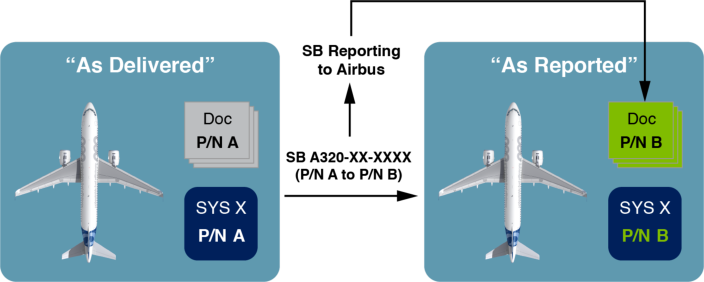
(fig.1) Reporting SB embodiment ensures that aircraft documentation is updated to match with the actual technical configuration of the aircraft.
For more information on service bulletin configuration management, refer to the “SB Configuration Management“ article published in Airbus FAST magazine #57 in 2016.
IPC Spare Parts
Section titled “IPC Spare Parts”The Illustrated Parts Catalog (IPC) enables Operators to use a compatible P/N instead of the original P/N of a component if it is not available. This prevents unnecessary grounding of an aircraft in the case of a component failure if the original P/N is not available as a spare.
Only P/Ns that are listed in the IPC as spares can be used to replace the installed P/N. This reinforces the need to report the embodiment of service bulletins to Airbus to ensure that the IPC provides the correct spare P/Ns.
Operators should be aware that if they use an IPC spare part, the aircraft documentation remains customized to the “As reported” configuration (fig.2).
If the IPC does not list spare P/Ns , the replacement component must have the same P/N.
If the IPC provides a spare P/N , it may temporarily be used to avoid unnecessary grounding of the aircraft.
If a spare P/N from the IPC is used , the aircraft documentation remains customized to the “As reported” configuration.
Check with Maintenance
Section titled “Check with Maintenance”Ground technicians should contact their maintenance engineering department if they have any doubt about the “As Reported” configuration versus the actual aircraft technical configuration.
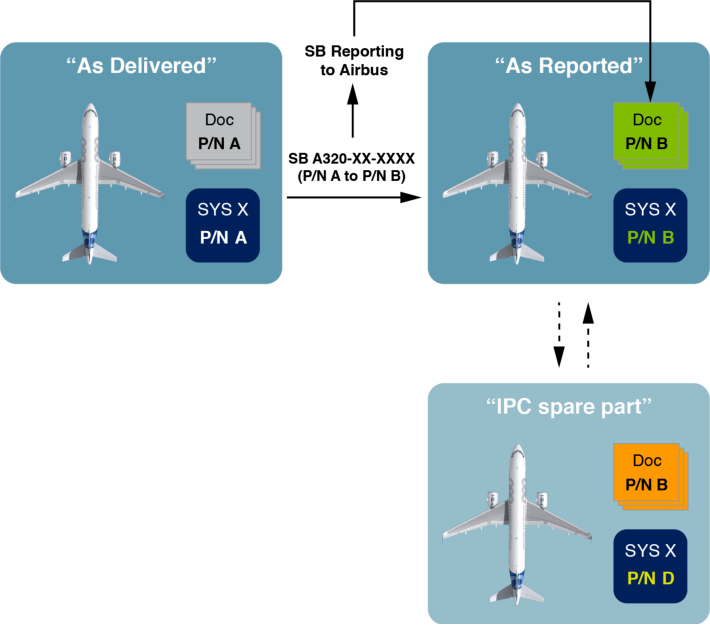
(fig.2) When an IPC spare P/N is used, the documentation remains customized to the original P/N
For more information on interchangeability and mixability rules, refer to the “Interchangeability/IPC spares PN” documentation available in the airnav[X] help center.
HANDLING DATA LOADABLE COMPUTERS
Section titled “HANDLING DATA LOADABLE COMPUTERS”How Technology Evolved to Ease Computer Updates
Section titled “How Technology Evolved to Ease Computer Updates”Line Replaceable Units (LRUs) and On Board Replaceable Module (OBRM)
Section titled “Line Replaceable Units (LRUs) and On Board Replaceable Module (OBRM)”To update a computer to a new standard on A300, A310, A320 family, A330, and A340 aircraft, a Line Replaceable Unit (LRU) can be replaced with an LRU at a new standard. For some computers on A320 family, A330, and A340 aircraft, the update can also be done by changing only a part of the computer hardware called On Board Replaceable Module (OBRM).
Data Loading Units (DLUs)
Section titled “Data Loading Units (DLUs)”A more recent generation of computers known as Data Loadable Units (DLUs) are now used for the majority of computers. Operators can update DLUs by directly loading updated software onto the units, also known as the Field Loadable Software (FLS) , using an interface in the cockpit or a portable data loader. Operators do not need to remove DLUs from the aircraft to perform their update. DLUs ease computer upgrades, simplify management of spare parts, and as a result, save time and cost.
Most of the computers installed on A220, A350 and A380 aircraft are DLUs. DLUs have been progressively introduced on A320 family, A330, and A340 aircraft since 2009. All currently delivered A320 family and A330 aircraft are equipped with several DLUs. Some computers on older A320 family, A330 and A340 aircraft are also being progressively replaced with newer DLUs. When installed with the relevant software standard, a DLU has the equivalent behavior of the older LRU that is not data loadable.
Ensuring the Correct Software is Installed
Section titled “Ensuring the Correct Software is Installed”Maintenance technicians must check the P/N of the software installed on a DLU to identify the actual computer standard. Checking the P/N of the DLU hardware alone is no longer sufficient. The software P/N must also be checked and treated like any other aircraft component, and its configuration should be managed in the same way.
Cases of Incorrect Software Installed
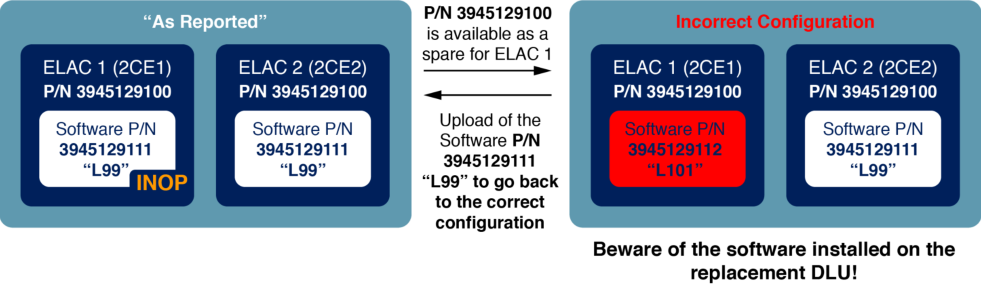
Section titled “Cases of Incorrect Software Installed”Failing to check the software P/N installed on a DLU caused many of the reported cases of incorrect aircraft technical configuration. As a typical example, when a DLU fails and is replaced with a DLU that has the same hardware P/N, the P/N of the software preinstalled on the new unit may not be correct (fig.3).
(fig.3) Example of incorrect technical configuration of Elevator & Aileron Computers (ELAC) on A320 family aircraft due to non-compatible software preinstalled on the replacement computer
The LRU Identification Steps in the AMM/MP/AMP
Section titled “The LRU Identification Steps in the AMM/MP/AMP”The ground technicians must perform all of the steps in the AMM/MP/AMP tasks for computer removal and installation. This includes the LRU IDENTIFICATION steps that enable them to check that both the P/N of the hardware and the P/N of the software of a computer are correct.
The LRU identification page can be accessed via the SYSTEM REPORT / TEST page on the MCDU (A320 family, A330, A340 aircraft) or via the OMS (A220, A350 and A380 aircraft).
The LRU IDENTIFICATION step of the AMM/MP/AMP task for computer installation is the last opportunity to check via the MCDU/OMS that the correct software P/N is installed on a computer.
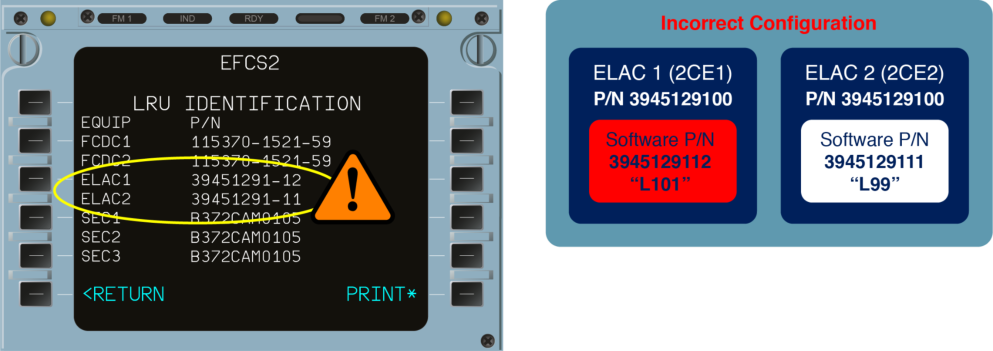
- (fig.4) Example of an incorrect technical configuration visible on the LRU IDENTIFICATION page of an A320 family aircraft
Managing Software on Airbus Aircraft
Section titled “Managing Software on Airbus Aircraft”A220, A350 and A380 aircraft introduced new challenges in configuration management for airlines due to the high number of software to manage and the increased possibility of customization.
To ensure smooth FLS operations, A350 and A380 Operators should have specific processes and roles dedicated to software configuration management within their organization. ISI 00.00.00095 and ISI 00.00.00188 articles are available on the AirbusWorld portal and provide generic FLS management recommendations in line with ARINC 667. These recommendations may also be useful for A320 family and A330 aircraft due to the number of DLU with FLS being progressively installed on these aircraft.
Airbus Customer Support has published the ISI article listed below on the AirbusWorld portal as well as an A220 Service Letter to help Operators and MROs to manage FLS.
ISI 00.00.00485: Field Loadable Software (FLS) - ISI Index
A220 Service Letter CS-SL-46-00-0003 : Field Loadable Software List
Section titled “A220 Service Letter CS-SL-46-00-0003 : Field Loadable Software List”Mixing DLU with non-DLU on A320/A330/A340 Aircraft
Section titled “Mixing DLU with non-DLU on A320/A330/A340 Aircraft”A mix of DLU and non-DLU computers is possible on A320 family, A330, and A340 aircraft. It requires clear identification of the computers that are DLUs and a strict adherence to the interchangeability and mixability rules defined in the IPC.
DLU identification:
Section titled “DLU identification:”A placard located on the computer hardware enables ground technicians to identify any computer that is a DLU (fig.5).
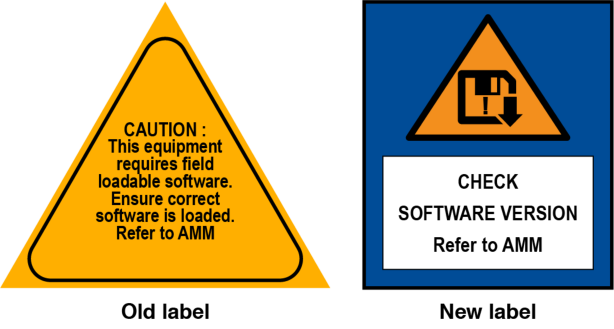
(fig.5) Examples of DLU identification placard
Mixability of DLU and Non-DLU Computers
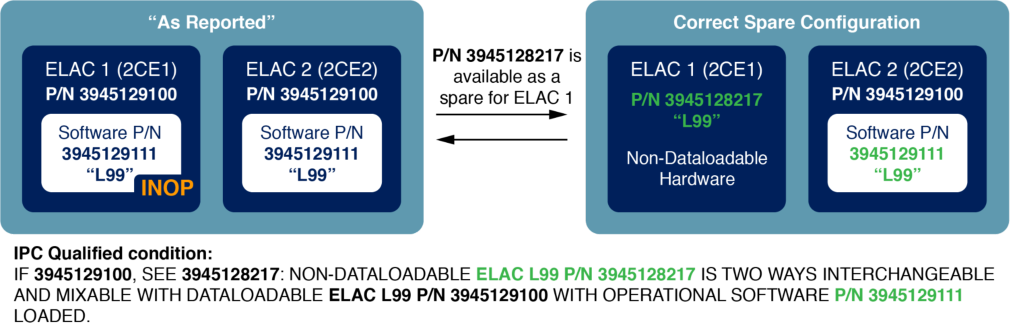
Section titled “Mixability of DLU and Non-DLU Computers”For some computer standards, both a DLU and a non-DLU version are available and are two-way interchangeable units. The IPC usually enables the DLU and non-DLU versions to be interchanged provided that the software of the DLU version is also loaded with the correct software P/N.
(fig.6) Example of mixability for DLU and non-DLU ELAC computers on A320 family aircraft
Awareness & Training for Maintenance
Section titled “Awareness & Training for Maintenance”Operators should ensure that maintenance technicians who work on A320 family, A330, and A340 aircraft are aware of the presence of DLUs on their aircraft and perform the necessary training to manage DLUs correctly.
CONFIGURATION COCKPIT TOOL
Section titled “CONFIGURATION COCKPIT TOOL”Airbus developed a tool called ” Configuration Cockpit ” to further assist Operators in managing their aircraft technical configuration. This tool has been available since May 2024 for Skywise customers, and since June 2025 for non-Skywise customers, for the A320 family, A330, A340, A350, and A380 aircraft.
The Configuration Cockpit tool brings an additional safety check in addition to the LRU IDENTIFICATION step against any configuration mismatch.
Concept of the Configuration Cockpit Tool
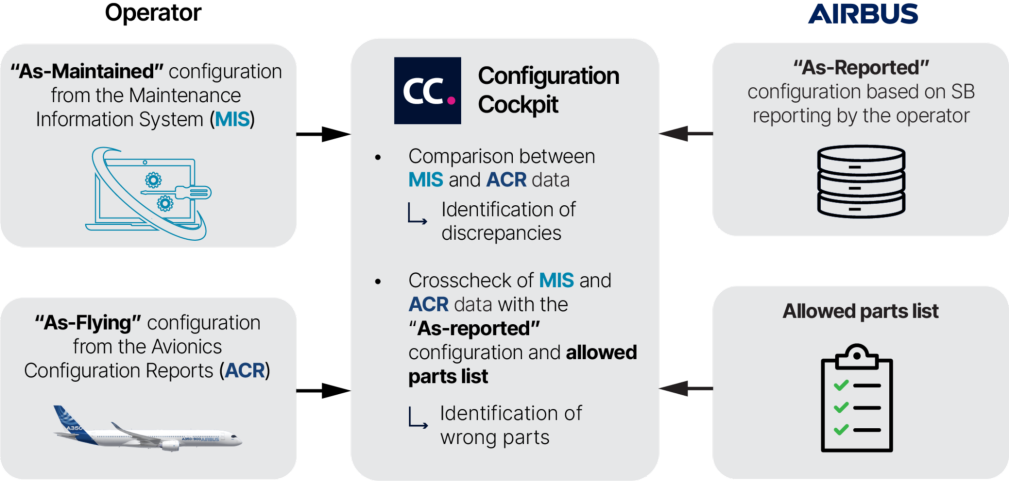
Section titled “Concept of the Configuration Cockpit Tool”The operator transmits the following configuration data files to the Configuration Cockpit tool:
-
The “ As-maintained ” configuration file for each aircraft, which corresponds to the aircraft configuration recorded in the operatorʼs Maintenance Information System (MIS) and/or,
-
The “ As-flying ” configuration file, which corresponds to the actual configuration of the aircraft listed in the Avionics Configuration Report (ACR) , generated by the maintenance or data loading system onboard the aircraft.
The data files are transmitted either automatically for Skywise customers, or manually for non-Skywise customers.
ISI 45.00.00056 , available on the AirbusWorld portal, provides guidance on how to retrieve the aircraft configuration on the various Airbus aircraft.
The Configuration Cockpit tool checks and compares the “ As-maintained ” and “ As-flying ” configurations of each aircraft. They are then compared to the “ As-reported ” configuration, known by Airbus, and crosschecked with the allowed parts list.
The results of these analyses are displayed in the Configuration Cockpit Interface.
(fig.7) Concept of the Configuration Cockpit tool
Configuration Cockpit Interface
Section titled “Configuration Cockpit Interface”The Configuration Cockpit consists of three modules to enable the operators to get access to their aircraft configuration information.
Configuration Checker
Section titled “Configuration Checker”The Configuration Checker module displays a configuration status for each aircraft. It highlights the number and percentage of identified configuration errors and lists the expected P/N (fig.8). A list of the wrong part numbers and the part numbers to be further analyzed can be displayed for each aircraft.
(fig.8) Home page of the Configuration Cockpit tool that displays fleet status
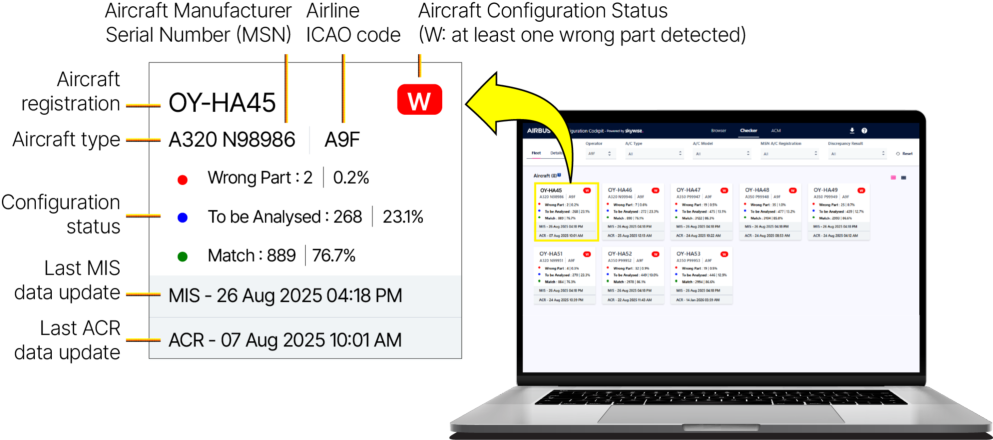
The configuration status displays the number of parts linked to a specific status:
-
Wrong Part : The part number received from MIS or ACR does not match with the allowed part numbers provided in “As-reported” configuration and allowed parts list. Another reason is that the interchangeability condition for the part is not fulfilled. A “Wrong part” is considered a configuration mismatch.
-
To be Analyzed : The configuration status of the part cannot be assessed automatically and requires manual checking by the Operator. This status applies to customized software parts or interchangeability conditions that cannot be determined automatically.
-
Match : The part number received from MIS or ACR matches the “As-reported” configuration and allowed parts list. The interchangeability condition, if any, is fulfilled.
Aircraft Configuration Matrix (ACM)
Section titled “Aircraft Configuration Matrix (ACM)”The ACM module enables operators to download the list of all the modifications and Service Bulletins installed on each aircraft.
Configuration Browser (Skywise customers only)
Section titled “Configuration Browser (Skywise customers only)”The Configuration Browser module displays the list of parts installed on the aircraft, derived from the MIS and ACR files, along with additional information. It also displays the list of modifications and Service Bulletins, including their respective concurrent requirements, if any.
Airbus Customer Support has published the ISI articles listed below on the AirbusWorld portal to provide the content and replay of the webinars about the Configuration Cockpit tool.
ISI 00.00.00471: Configuration Cockpit for Skywise Core - Webinar
Section titled “ISI 00.00.00471: Configuration Cockpit for Skywise Core - Webinar”ISI 00.00.00488: Configuration Cockpit for non-Skywise Core - Webinar
Contributors: Jean François BOURCHANIN Flight Control System Technical Advisor Customer Support Pierre CAUMONT Head of Configuration Management Operations Customer Support
Matthieu GACHET Configuration Management Operations Customer Support
Steven HOLDER Configuration Management Operations Customer Support
Arturo MARTINEZ GRACIDA Maintenance Human Factor Specialist Design Office
Laurent MASSONNIER Ground Test Software Expert
Proper aircraft configuration management and consistent aircraft documentation are key elements to flight safety:
-
Operators must ensure correct aircraft technical configuration management and inform Airbus when they have embodied service bulletins on their aircraft so that their documentation reflects the actual aircraft technical configuration. This will ensure that the maintenance technicians and flight crew have the appropriate information and procedures to safely maintain and operate the aircraft.
-
Operators must only use a spare part that is listed in the IPC to prevent the grounding of an aircraft if the original P/N is not available.
-
Maintenance technicians must check the software P/N installed on Data Loadable Units to ensure that the correct software standards are installed on the computers. The LRU identification step of the AMM/MP/AMP procedure for installation of a computer is the last opportunity to check that the software installed on a computer is correct. This step must not be skipped, even if the technicians are under operational pressure.
The Configuration Cockpit tool is now available to all Operators. It provides an additional safety net to check that the aircraft current technical configuration is in line with the list of allowed parts.
Cyril MONTOYA Maintenance Safety Enhancement Manager Customer Support
Lilian SEGONDS Field Loadable Software Operations expert Customer Support
With thanks to Jason BURGE, Jean-Philippe JACQ and Alexandre LAGU from Customer Support and Francis Péloquin from Airbus Canada
Safety first, 2025. Safety first is published by Airbus S.A.S. 1, rond point Maurice Bellonte - 31707 Blagnac Cedex/France.
Editor: Yannick Malinge, SVP Head of Aviation Safety.
Editorial team: Guillaume Estragnat, Vanessa Sadi, Gwyneth Duggan, Javier Martinez Marina, Agathe Sanz, Bruno Fargeon.
Photos by Airbus.
确保正确的飞机技术构型
Section titled “确保正确的飞机技术构型”
在技术构型不正确的飞机上飞行可能导致系统出现意外行为,进而引发事故或严重事故征候。这种情况可能发生在飞机配备了未经批准在该飞机上安装的硬件或软件时。不正确的技术构型或文件也可能导致文件与飞机实际技术构型之间产生不一致。
本文回顾了技术构型管理的关键方面,强调了检查硬件和软件件号(P/N)的重要性,并描述了空客开发的工具,以帮助运营商确保在飞机上安装正确的P/N。
本文首次发表于2021年6月,于2025年11月更新,新增了配置驾驶舱工具(Configuration Cockpit)的描述。
Section titled “本文首次发表于2021年6月,于2025年11月更新,新增了配置驾驶舱工具(Configuration Cockpit)的描述。”本文也可在 safetyfirst.airbus.com 以及 iOS 和 Android 版 Safety first 应用中获取。
多起报告的不正确飞机技术构型案例
Section titled “多起报告的不正确飞机技术构型案例”每年有超过200起不正确飞机技术构型案例被报告给空客。在所有案例中,飞机都是配备了未经批准在该飞机上安装的硬件或软件标准而被放行的。
不正确飞机技术构型的后果
Section titled “不正确飞机技术构型的后果”某些飞机系统出现不正确行为的风险
Section titled “某些飞机系统出现不正确行为的风险”不正确的飞机技术构型可能导致系统出现意外行为,这可能影响飞行安全,尤其是当不正确构型影响飞行控制或飞行引导计算机,或导致某些系统功能不可用时。
文档提供不适当信息或程序的风险
Section titled “文档提供不适当信息或程序的风险”飞机技术构型的不匹配也可能导致飞机文档(如AMM、IPC、FCOM、QRH、MMEL)无法反映飞机的实际技术构型。这可能导致文档向飞行机组或维修人员提供不适当的信息或程序。
“不正确的飞机技术构型可能导致系统出现意外行为,这可能影响飞行安全”
飞机技术构型如何演变
Section titled “飞机技术构型如何演变”“交付时”构型
Section titled ““交付时”构型”“交付时”构型对应于飞机交付时的技术构型。交付时构型在飞机检验报告(AIR)中描述。
“按报告”构型
Section titled ““按报告”构型”运营商可以在飞机整个使用寿命期间通过服务通告(SB)实施系统改进、修正或添加新功能。SB通过添加、更换或修改由新件号(P/N)标识的硬件和/或软件部件来改变飞机构型。运营商必须将服务通告的实施报告给空客,因为空客使用飞机的**“按报告”构型来定制飞机维护和运行文档的内容(图1)**。按报告构型也是机队性能分析和优化的基础。
“空客使用飞机的’按报告’构型来定制飞机维护和运行文档的内容”
向空客报告SB实施情况对于获取最新维护和运行文档至关重要。
(图1) 报告SB实施情况可确保飞机文档更新以匹配飞机的实际技术构型。
有关服务通告配置管理的更多信息,请参阅2016年空客FAST杂志第57期发表的“SB Configuration Management(SB配置管理)”文章。
IPC 零部件
Section titled “IPC 零部件”图解零件目录(IPC)使运营商能够在原件号不可用时使用兼容的件号(P/N)来替代组件的原始件号。这可以避免在原件号没有库存备件的情况下因组件故障而导致飞机不必要的停场。
只有列在IPC中作为备件的件号才能用于更换已安装的件号。这强化了向空客报告服务通告实施情况的必要性,以确保IPC提供正确的备件件号。
运营商应注意,如果使用IPC备件,飞机技术文件仍保持 “已报告” 配置定制 (图2)。
如果IPC未列出备件件号 ,则替换组件 必须具有相同的件号 。
如果IPC提供了备件件号 ,可以 临时 使用以避免飞机不必要的停场。
如果使用了IPC的备件件号 ,则 飞机技术文件仍保持”已报告”配置定制。
与维护部门核对
Section titled “与维护部门核对”地面技术人员如果对 “已报告” 配置与实际飞机技术配置有任何疑问,应联系其维护工程部门。
(图2) 使用IPC备件件号时,技术文件仍保持对原始件号的定制
有关互换性和混装规则的更多信息,请参阅 airnav[X] 帮助中心提供的”互换性/IPC备件件号”文档。
数据加载计算机的处理
Section titled “数据加载计算机的处理”技术如何发展以简化计算机更新
Section titled “技术如何发展以简化计算机更新”航线可更换件(LRU)和机载可更换模块(OBRM)
Section titled “航线可更换件(LRU)和机载可更换模块(OBRM)”要在A300、A310、A320系列、A330和A340飞机上将计算机更新至新标准,可以用具有新标准的航线可更换件(LRU)替换现有LRU。对于A320系列、A330和A340飞机上的某些计算机,也可以只更换称为机载可更换模块(OBRM)的部分计算机硬件来完成更新。
数据加载单元(DLU)
Section titled “数据加载单元(DLU)”被称为 数据加载单元(DLU) 的更新一代计算机现已用于大多数计算机。运营商可以通过驾驶舱内的接口或便携式数据加载器直接向DLU加载更新后的软件(也称为 现场可加载软件(FLS) )来更新DLU。运营商无需将DLU从飞机上拆下即可执行更新。DLU简化了计算机升级流程,简化了备件管理,从而节省了时间和成本。
A220、A350和A380飞机上安装的大多数计算机都是DLU。DLU自2009年起已逐步应用于A320系列、A330和A340飞机。目前交付的所有A320系列和A330飞机都配备有数个DLU。A320系列、A330和A340飞机上的一些较老计算机也正在逐步被更新的DLU取代。当安装了相关软件标准后,DLU具有与不可数据加载的旧式LRU相同的功能。
确保安装正确的软件
Section titled “确保安装正确的软件”维护技术人员必须检查安装在DLU上的软件件号,以确定计算机的实际标准。仅仅检查DLU硬件的件号已不再足够。还必须检查软件件号,并将其作为飞机其他组件一样对待,其配置应以相同的方式进行管理。
软件安装错误的案例
Section titled “软件安装错误的案例”未能检查安装在DLU上的软件件号是导致许多飞机技术配置错误报告的原因。作为典型案例,当DLU发生故障并更换为具有相同硬件件号的DLU时,新设备上预装的软件件号可能不正确 (图3)。
(图3) 由于更换计算机上预装了不兼容的软件,导致A320系列飞机升降舵和副翼计算机(ELAC)技术配置错误的示例
AMM/MP/AMP中的LRU识别步骤
Section titled “AMM/MP/AMP中的LRU识别步骤”地面技术人员必须执行AMM/MP/AMP中计算机拆装任务的全部步骤。这包括LRU识别步骤,使技术人员能够检查计算机的硬件件号和软件件号是否正确。
LRU识别页面可以通过MCDU上的 系统报告/测试页面(A320系列、A330、A340飞机)或通过OMS(A220、A350和A380飞机)访问。
计算机安装的AMM/MP/AMP任务中的LRU识别步骤是通过MCDU/OMS检查计算机上是否安装了正确软件件号的最后机会。
- (图4) A320系列飞机LRU识别页面上可见的技术配置错误示例
空客飞机软件管理
Section titled “空客飞机软件管理”由于需要管理的软件数量众多,且定制的可能性增加,A220、A350 和 A380 飞机给航空公司的构型管理带来了新的挑战。
为确保 FLS 顺畅运行,A350 和 A380 运营商应在组织内部设立专门的流程和角色来进行软件构型管理。ISI 00.00.00095 和 ISI 00.00.00188 文章可在 AirbusWorld 门户查阅,并提供符合 ARINC 667 标准的通用 FLS 管理建议。由于 A320 系列和 A330 飞机上逐步安装了带有 FLS 的 DLU,这些建议对这两型飞机也可能有所帮助。
空客客户支持已在 AirbusWorld 门户发布了以下 ISI 文章,同时发布了 A220 服务函,以帮助运营商和 MRO 管理 FLS。
ISI 00.00.00485: 现场可加载软件(FLS)— ISI 索引
A220 服务函 CS-SL-46-00-0003 :现场可加载软件清单
Section titled “A220 服务函 CS-SL-46-00-0003 :现场可加载软件清单”A320/A330/A340 飞机上 DLU 与非 DLU 的混装
Section titled “A320/A330/A340 飞机上 DLU 与非 DLU 的混装”在 A320 系列、A330 和 A340 飞机上,DLU 和非 DLU 计算机可以混装。这要求明确识别哪些计算机是 DLU,并严格遵守 IPC 中定义的可互换性和混装规则。
DLU 识别:
Section titled “DLU 识别:”计算机硬件上的标牌使地面技术人员能够识别任何 DLU 计算机 (图 5)。
(图 5) DLU 识别标牌示例
DLU 与非 DLU 计算机的混装性
Section titled “DLU 与非 DLU 计算机的混装性”对于某些计算机标准,DLU 和非 DLU 版本均有供货,且为双向可互换件。IPC 通常允许 DLU 和非 DLU 版本互换,但前提是 DLU 版本也加载了正确软件 P/N。
(图 6) A320 系列飞机上 DLU 和非 DLU ELAC 计算机混装示例
维修意识与培训
Section titled “维修意识与培训”运营商应确保在 A320 系列、A330 和 A340 飞机上工作的维修技术人员了解其飞机上 DLU 的存在,并进行必要的培训以正确管理 DLU。
构型驾驶舱工具
Section titled “构型驾驶舱工具”空客开发了一款名为”构型驾驶舱(Configuration Cockpit)“的工具,以进一步协助运营商管理其飞机技术构型。该工具自 2024 年 5 月起向 Skywise 客户开放,自 2025 年 6 月起向非 Skywise 客户开放,适用于 A320 系列、A330、A340、A350 和 A380 飞机。
构型驾驶舱工具在 LRU IDENTIFICATION 步骤的基础上增加了额外的安全检查,以防止任何构型不匹配。
构型驾驶舱工具的概念
Section titled “构型驾驶舱工具的概念”运营商向构型驾驶舱工具传输以下构型数据文件:
-
每架飞机的”维护现状(As-maintained)“构型文件,对应运营商**维护信息系统(MIS)**中记录的飞机构型和/或
-
“飞行现状(As-flying)“构型文件,对应**航电构型报告(ACR)**中列出的飞机实际构型,该报告由机上维护或数据加载系统生成。
数据文件传输方式:Skywise 客户自动传输,非 Skywise 客户手动传输。
ISI 45.00.00056 可在 AirbusWorld 门户查阅,提供了在各型空客飞机上获取飞机构型的指导。
构型驾驶舱工具检查并比较每架飞机的”维护现状”和”飞行现状”构型。然后将其与空客已知的”报告现状(As-reported)“构型进行比较,并与允许件清单交叉核对。
这些分析结果在构型驾驶舱界面中显示。
(图 7) 构型驾驶舱工具概念
构型驾驶舱界面
Section titled “构型驾驶舱界面”构型驾驶舱由三个模块组成,使运营商能够访问其飞机构型信息。
构型检查器模块显示每架飞机的构型状态。它突出显示已识别构型错误的数量和百分比,并列出预期的 P/N (图 8)。可显示每架飞机的错误件号和需要进一步分析的件号列表。
(图 8) 显示机队状态的构型驾驶舱工具主页
构型状态显示与特定状态关联的件号数量:
-
错误件(Wrong Part) :从 MIS 或 ACR 收到的件号与”报告现状”构型和允许件清单中提供的允许件号不匹配。另一个原因是该部件的互换性条件未满足。“错误件”被视为构型不匹配。
-
待分析(To be Analyzed) :无法自动评估该部件的构型状态,需要运营商手动检查。此状态适用于定制软件件或无法自动确定的互换性条件。
-
匹配(Match) :从 MIS 或 ACR 收到的件号与”报告现状”构型和允许件清单一致。如果有互换性条件,则已满足。
飞机构型矩阵 (ACM)
Section titled “飞机构型矩阵 (ACM)”ACM 模块使运营商能够下载安装在各架飞机上的所有改装和服务通告清单。
构型浏览器(仅限 Skywise 客户)
Section titled “构型浏览器(仅限 Skywise 客户)”构型浏览器模块显示飞机上安装的部件清单(源自 MIS 和 ACR 文件)以及其他附加信息。该模块还显示改装和服务通告清单,包括各自的并行要求(如有)。
空客客户支持已在 AirbusWorld 门户网站上发布了以下 ISI 文章,以提供关于构型驾驶舱工具的网络研讨会内容和回放。
ISI 00.00.00471: 构型驾驶舱 for Skywise Core - 网络研讨会
Section titled “ISI 00.00.00471: 构型驾驶舱 for Skywise Core - 网络研讨会”ISI 00.00.00488: 构型驾驶舱 for 非 Skywise Core - 网络研讨会
撰稿人:Jean François BOURCHANIN 客户支持 飞控系统技术顾问 Pierre CAUMONT 客户支持 构型管理运营主管
Matthieu GACHET 客户支持 构型管理运营
Steven HOLDER 客户支持 构型管理运营
Arturo MARTINEZ GRACIDA 设计办公室 维修人为因素专家
Laurent MASSONNIER 地面测试软件专家
正确的飞机构型管理和一致的飞机文档是飞行安全的关键要素:
-
运营商必须确保正确的飞机技术构型管理,并在其飞机上实施了服务通告时通知空客,以确保其文档反映实际的飞机技术构型。这将确保维修技术人员和飞行机组拥有适当的信息和程序,以安全地维护和操作飞机。
-
运营商必须仅使用 IPC 中列出的备用件,以防止当原始件号不可用时导致飞机停场。
-
维修技术人员必须检查数据可加载组件上安装的软件件号,以确保计算机上安装了正确的软件标准。计算机安装的 AMM/MP/AMP 程序的 LRU 识别步骤是检查计算机上安装的软件是否正确的最后机会。即使技术人员在操作压力下,也不得跳过此步骤。
构型驾驶舱工具现已向所有运营商开放。它提供了一层额外的安全保障,以检查飞机当前技术构型是否与允许部件清单一致。
Cyril MONTOYA 客户支持 维修安全提升经理
Lilian SEGONDS 客户支持 现场可加载软件运营专家
特别感谢客户支持的 Jason BURGE、Jean-Philippe JACQ 和 Alexandre LAGU,以及 Airbus Canada 的 Francis Péloquin
Safety first,2025。Safety first 由空中客车公司出版。1, rond point Maurice Bellonte - 31707 Blagnac Cedex/法国。
主编:Yannick Malinge,航空安全高级副总裁。
编辑团队:Guillaume Estragnat、Vanessa Sadi、Gwyneth Duggan、Javier Martinez Marina、Agathe Sanz、Bruno Fargeon。
照片由空客提供。