A320 landing gear downlock
Source: Airbus Safety First URL: https://safetyfirst.airbus.com/a320-landing-gear-downlock/ Published: 2010-08-14 Magazine Issue: 2010-08 Category: Archive PDF: Original PDF
Safety
Christopher MCGREGOR
Section titled “Christopher MCGREGOR”Director, Flight Safety
1. Introduction
Section titled “1. Introduction”A prelude to two runway excursions was a spurious landing gear not downlocked indication on the landing gear indication panel. The spurious indication led to unnecessary application of the LDG WITH ABNORMAL L/G QRH procedure.
This article summarizes the correct interpretation of landing gear downlock indications to prevent re-occurrence.
2. Landing gear position status
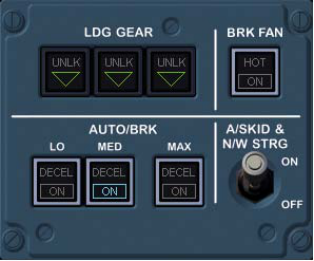
Section titled “2. Landing gear position status”LDG GEAR CTL panel receives landing gear position feedback from LGCIU1 ONLY
LGCIU1
LGCIU2
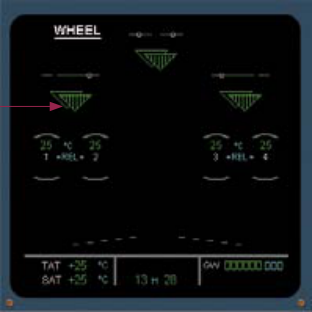
ECAM WHEEL Systems Display (SD) page displays the landing gear position feedback from both LGCIU1 and LGCIU2
Figure 1 Landing gear control and indication architecture
2.1. Landing gear control and indication architecture
Section titled “2.1. Landing gear control and indication architecture”The Airbus A320 utilise two Landing Gear Control and Indication Units (LGCIU1 and LGCIU2). The LGCIUs provide the inputs and feedback necessary to control the landing gear. In addition to the control inputs, the LGCIUs provide the system parameters for the flight deck display and fault annunciation. System redundancy is reflected by LGCIU1 and LGCIU2 (fig1).
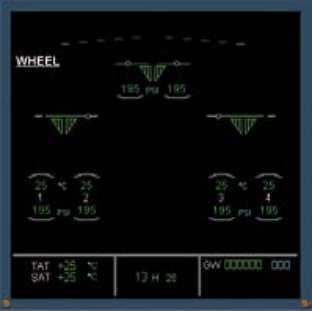
Figure 2 EIS 1 versus EIS 2 WhEEL Systems Display Page
This article will utilise the EIS 1 display for the illustrations. However the article is applicable to both EIS 1 and EIS 2 displays.
2.2. Gear selected dOwN / No sensor failure / Normal landing gear downlocked indications
Section titled “2.2. Gear selected dOwN / No sensor failure / Normal landing gear downlocked indications”Following gear selection and downlock, the flight crew will observe the green downlock lights on the landing gear panel and two green triangles per landing gear position on the ECAM WHEEL Systems Display (SD) page. This provides confirmation that the gear is properly downlocked (fig 3).
Figure 3 Normal landing gear panel and WhEEL Systems Display landing gear downlocked indications following gear down selection
2.3. Gear selected dOwN / Sensor failure / Spurious landing gear not downlocked indications
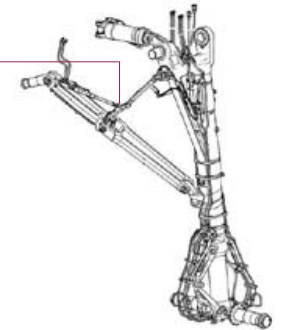
Section titled “2.3. Gear selected dOwN / Sensor failure / Spurious landing gear not downlocked indications”The LGCIU1 proximity sensors located on the each landing gear strut provides the lock/unlock signal to the landing gear indication panel. Failure of one of these sensors could generate a spurious main landing gear not downlocked (“UNLK”) red light and a single red triangle on the SD WHEEL page (fig 4).
In the event of a genuine landing gear strut detected as not downlocked by both LGCIU1 and LGCIU2 sensors, the “L/G GEAR NOT DOWNLOCKED” ECAM warning will be triggered, along with associated warnings: q Continuous Repetitive Chime audio warning, and MASTER WARN light q UNLK red light on the LDG GEAR CTL panel q On the ECAM WHEEL SD page, both red lights are displayed on the affected landing gear strut q RED ARROW on the LDG CTL lever panel q ECAM memo “LDG LDG GEAR DN” (blue).
On gear selection, one green triangle on the ECAM SD WHEEL page and the green “LDG LDG GEAR DN” memo on the E/WD is sufficient to confirm the landing gear is down and locked.
Safety
2.4. At 750 ft RA, gear not selected dOwN / No sensor failure/ Normal landing gear indications
Section titled “2.4. At 750 ft RA, gear not selected dOwN / No sensor failure/ Normal landing gear indications”The “L/G GEAR NOT DOWN” ECAM warning is triggered passing 750 ft RA in approach to warn the flight crew that the landing gear is not set to DOWN while the aircraft is in the landing configuration. This alert must not be confused with the “L/G GEAR NOT DOWNLOCKED” ECAM warning that indicates that the landing gear is detected as not downlocked by both LGCIUs (fig 5).
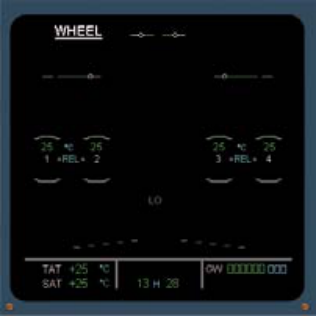
Figure 5 Illustration of “L/G GEAR NOT DOWN” ECAM warning display – landing gear lever not selected but aircraft in landing configuration passing 750ft RA
2.5. At 750 ft RA, gear selected dOwN / Sensor failure / Spurious landing gear not down indications
Section titled “2.5. At 750 ft RA, gear selected dOwN / Sensor failure / Spurious landing gear not down indications”However, on the A320 Family, this warning could also be triggered when the landing gear is detected as not downlocked by one LGCIU. In this case, check that at least one green triangle is displayed on each landing gear strut on the ECAM WHEEL page. This confirms that the landing gear is downlocked. Rely also on the “LDG LDG GEAR DN” green LDG memo message to confirm that the landing gear is downlocked (fig 6).
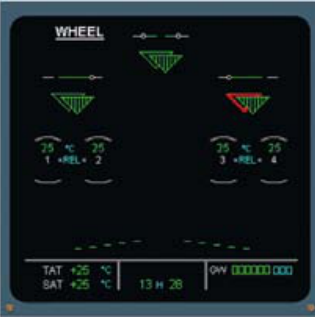
Figure 6 IIllustration of spurious “L/G GEAR NOT DOWN” indication
As per SOP, following gear selection down, the PNF has to check for three landing gear indications on the ECAM WHEEL page: at least one green triangle on each landing gear strut is sufficient to indicate that the landing gear is downlocked. In addition, the E/WD “LDG LDG GEAR DN” green memo on the ECAM (before landing checklist) also confirms the landing gear is down and locked.
| Selection | Landing Gear Selector down | Landing Gear Selector down | Landing Gear Selector down | Landing Gear Selector down |
|---|---|---|---|---|
| Indication | Sensor failure | Sensor failure | Sensor failure | Confrmed failure |
| UPPER ECAM | No ECAM warning |
3. In-service events
Section titled “3. In-service events”To help distinguish between a genuine and a spurious landing gear not downlocked position indication, the following inservice events are summarized (fig 7).
In the cases of spurious landing gear not downlocked indication illustrated in fig 7, the flight crew applied the L/G gear gravity extension and LDG with abnormal landing gear QRH procedures.
As per procedure the application of these paper checklists disables: q Anti-skid q Ground spoilers q Nose-wheel steering q Auto-brake
The increased workload can be appreciated, hence the need to avoid applying these procedures unless necessary.
Distinguish between L/G GEAR NOT DOWN and L/G GEAR NOT DOWNLOCKED.
4. Ongoing development
Section titled “4. Ongoing development”The FCOM and QRH procedures have been enhanced to prevent unnecessary application of the L/G GRAVITY EXTENSION and LDG WITH ABNORMAL L/G procedures (A320 Family FCOM/QRH June 2010 general revision).
The revised procedures include the following caution:
Caution :
Section titled “Caution :”Do not apply this procedure if at least one green triangle is displayed on each landing gear strut on the ECAM SD WHEEL page. This is sufficient to confirm that the landing gear is downlocked. Disregard any possible L/G GEAR NOT DOWN ECAM warning at 750 feet RA.
As previously discussed , on A320 Family aircraft the “L/G GEAR NOT DOWN” warning may also appear at 750ft RA when the landing gear is confirmed down by only one LGCIU. Under these conditions the new Flight Warning Computer development FWC (F6) will inhibit the spurious “L/G GEAR NOT DOWN” message.
Figure 7 Summary of in-service events
5. Conclusion
Section titled “5. Conclusion”Flight crews have entered unnecessarily into the L/G GRAVITY EXTENSION and LDG WITH ABNORMAL L/G QRH procedures, whereas the landing gear was actually downlocked. This has created significant additional workload during the landing phase. To prevent reoccurrence, in all cases (and as per SOP) refer to the ECAM WHEEL SD page to check that the landing gear is downlocked. Rely also on the “LDG LDG GEAR DN” green LDG memo message during the LANDING CHECKLIST.
Do not confuse “L/G GEAR NOT DOWN” with “L/G GEAR NOT DOWNLOCKED” ECAM warning. In the case of a genuine unlocked landing gear, the ECAM will alert the flight crew and trigger a “L/G GEAR NOT DOWNLOCKED” ECAM warning after gear selection down.
On landing gear down selection, the key message is
One green triangle on the ECAM WHEEL SD page and a “LDG LDG GEAR DN” green memo on the E/WD (Before Landing Checklist) confirms the landing gear is down and locked.
Safety
A320 起落架下位锁
Section titled “A320 起落架下位锁”来源: Airbus Safety First 网址: https://safetyfirst.airbus.com/a320-landing-gear-downlock/ 发布日期: 2010-08-14 杂志期号: 2010-08 分类: Archive PDF: Original PDF
Safety
Christopher MCGREGOR
Section titled “Christopher MCGREGOR”总监,飞行安全
两起跑道偏出事件的前兆是起落架指示面板上出现的虚假起落架未下位锁指示。该虚假指示导致不必要的执行了 LDG WITH ABNORMAL L/G QRH 程序。
本文总结了正确解读起落架下位锁指示的方法,以防止此类事件再次发生。
2. 起落架位置状态
Section titled “2. 起落架位置状态”LDG GEAR CTL 面板仅接收来自 LGCIU1 的起落架位置反馈
LGCIU1
LGCIU2
ECAM WHEEL 系统显示 (SD) 页面显示来自 LGCIU1 和 LGCIU2 两者的起落架位置反馈
图 1 起落架控制和指示架构
2.1. 起落架控制和指示架构
Section titled “2.1. 起落架控制和指示架构”空客 A320 使用两个起落架控制指示组件(LGCIU1 和 LGCIU2)。LGCIU 提供控制和反馈所必需的输入,以控制起落架。除控制输入外,LGCIU 还提供飞行机组显示和故障通告所需的系统参数。LGCIU1 和 LGCIU2 之间的系统冗余保证了可靠性 (图1)。
图 2 EIS 1 与 EIS 2 WHEEL 系统显示页面对比
本文将使用 EIS 1 显示进行图示说明。但本文同样适用于 EIS 1 和 EIS 2 两种显示。
2.2. 起落架选择 DOWN / 无传感器故障 / 正常起落架下位锁指示
Section titled “2.2. 起落架选择 DOWN / 无传感器故障 / 正常起落架下位锁指示”完成起落架选择和下位锁后,飞行机组将在起落架面板上观察到绿色下位锁指示灯,并在 ECAM WHEEL 系统显示 (SD) 页面上观察到每个起落架位置两个绿色三角符号。这确认了起落架已正确下位锁 (图 3)。
图 3 起落架选择 DOWN 后正常的起落架面板和 WHEEL 系统显示下位锁指示
2.3. 起落架选择 DOWN / 传感器故障 / 虚假起落架未下位锁指示
Section titled “2.3. 起落架选择 DOWN / 传感器故障 / 虚假起落架未下位锁指示”安装在每个起落架支柱上的 LGCIU1 近距传感器向起落架指示面板提供锁/未锁信号。其中一个传感器故障可能产生虚假的主起落架未下位锁(“UNLK”)红色指示灯,以及 SD WHEEL 页面上一个单独的红色三角符号 (图 4)。
如果两个 LGCIU1 和 LGCIU2 传感器同时检测到起落架支柱未下位锁,则会触发”L/G GEAR NOT DOWNLOCKED” ECAM 警告,并伴随相关警告:
- 连续重复谐音音频警告和 MASTER WARN 灯
- LDG GEAR CTL 面板上的 UNLK 红色指示灯
- 在 ECAM WHEEL SD 页面上,受影响起落架支柱上显示两个红色指示灯
- LDG CTL 操纵杆面板上的红色箭头
- ECAM 备忘 “LDG LDG GEAR DN”(蓝色)
选择起落架后,ECAM SD WHEEL 页面上一个绿色三角符号和 E/WD 上绿色的 “LDG LDG GEAR DN” 备忘信息足以确认起落架已下位并锁定。
Safety
2.4. 在 750 ft RA,起落架未选择 DOWN / 无传感器故障 / 正常起落架指示
Section titled “2.4. 在 750 ft RA,起落架未选择 DOWN / 无传感器故障 / 正常起落架指示”当飞机处于着陆构型时,飞越 750 ft RA 过程中,“L/G GEAR NOT DOWN” ECAM 警告被触发,以警告飞行机组起落架未设置到 DOWN 位。切勿将此警告与”L/G GEAR NOT DOWNLOCKED” ECAM 警告混淆,后者表示起落架被两个 LGCIU 检测为未下位锁 (图 5)。
图 5 说明”L/G GEAR NOT DOWN” ECAM 警告显示——起落架操纵杆未选择但飞机在飞越 750 ft RA 时处于着陆构型
2.5. 在 750 ft RA,起落架已选择 DOWN / 传感器故障 / 虚假起落架未 DOWN 指示
Section titled “2.5. 在 750 ft RA,起落架已选择 DOWN / 传感器故障 / 虚假起落架未 DOWN 指示”然而,在 A320 系列上,当起落架被一个 LGCIU 检测为未下位锁时,此警告也可能被触发。在这种情况下,检查 ECAM WHEEL 页面上每个起落架支柱是否至少显示一个绿色三角符号。这确认了起落架已下位锁。同时依靠”LDG LDG GEAR DN”绿色 LDG 备忘信息来确认起落架已下位锁 (图 6)。
图 6 虚假”L/G GEAR NOT DOWN”指示的图示说明
根据 SOP,在选择起落架放下后,PNF 必须在 ECAM WHEEL 页面上检查三个起落架指示:每个起落架支柱上至少一个绿色三角符号足以表明起落架已下位锁。此外,ECAM 上的 E/WD “LDG LDG GEAR DN” 绿色备忘(在着陆检查单前)也可确认起落架已下位并锁定。
| 选择 | 起落架选择器 DOWN | 起落架选择器 DOWN | 起落架选择器 DOWN | 起落架选择器 DOWN |
|---|---|---|---|---|
| 指示 | 传感器故障 | 传感器故障 | 传感器故障 | 确认故障 |
| UPPER ECAM | 无 ECAM 警告 |
3. 运营事件
Section titled “3. 运营事件”为帮助区分真实的与虚假的起落架未锁定位置指示,以下总结了运营事件 (图 7)。
在图 7 所示的虚假起落架未锁定指示案例中,飞行机组执行了起落架重力放下(L/G GEAR GRAVITY EXTENSION)和异常起落架着陆(LDG WITH ABNORMAL L/G)QRH 程序。
根据程序,这些纸质检查单的应用将导致以下系统不可用:q 防滞 q 地面扰流板 q 前轮转弯 q 自动刹车
工作量会显著增加,因此除非必要,应避免执行这些程序。
区分 L/G GEAR NOT DOWN 与 L/G GEAR NOT DOWNLOCKED。
4. 持续改进
Section titled “4. 持续改进”FCOM 和 QRH 程序已增强,以防止不必要地执行起落架重力放下和异常起落架着陆程序(A320 系列 FCOM/QRH 2010 年 6 月版总体修订)。
修订后的程序包含以下注意事项:
如果在 ECAM SD 轮页( WHEEL page)上每个起落架支柱至少显示一个绿色三角,则不要执行此程序。这足以确认起落架已锁定。忽略在无线电高度 750 英尺处可能出现的任何 L/G GEAR NOT DOWN ECAM 警告。
如前所述,在 A320 系列飞机上,当起落架仅由一个 LGCIU 确认放下时,“L/G GEAR NOT DOWN”警告也可能在无线电高度 750 英尺处出现。在此情况下,新开发的飞行警告计算机 FWC(F6)将抑制虚假的“L/G GEAR NOT DOWN”信息。
图 7 运营事件汇总
飞行机组在起落架实际已锁定的情况下,不必要地进入了起落架重力放下和异常起落架着陆 QRH 程序。这在着陆阶段造成了显著的工作量增加。为防止再次发生,在所有情况下(并按照 SOP),请参考 ECAM 轮页( WHEEL SD)确认起落架已锁定。在落地检查单(LANDING CHECKLIST)期间,也可依赖“LDG GEAR DN”绿色落地备忘信息。
不要将“L/G GEAR NOT DOWN”与“L/G GEAR NOT DOWNLOCKED” ECAM 警告混淆。如果起落架确实未锁定,ECAM 将提醒飞行机组,并在起落架选择放下后触发“L/G GEAR NOT DOWNLOCKED” ECAM 警告。
在选择放下起落架时,关键信息是:
ECAM 轮页( WHEEL SD)上的一个绿色三角加上 E/WD 上的“LDG GEAR DN”绿色备忘(在落地前检查单中)可确认起落架已放下并锁定。
Safety